Automation
Intelligent Automation for Operational Efficiency
We design structured automation systems that reduce manual work, eliminate repetitive tasks, and integrate and orchestrate your existing tools.
Where Automation Delivers Value
Automation improves how organisations manage information, processes, and communication between systems.
Instead of manual coordination between tools, structured automation allows processes to run automatically across platforms.
Common improvements include:
• automated data movement between systems
• workflow triggers and task routing
• automated notifications and reporting
• scheduled operational processes
• integration between business platforms
What We Automate
We build automation systems that integrate with your existing software and processes.
This includes:
- CRM and platform integrations
- API-based workflow automation
- Automated reporting pipelines
- Data synchronisation systems
- Form and submission routing
- Internal notification systems
- Scheduled operational workflows
Every automation is designed around measurable operational improvement.
We automate where it creates measurable operational gain.
Sales & Lead Automation
Systems that capture leads, qualify opportunities, and route enquiries automatically.
Examples include:
• lead capture and CRM updates
• automated follow-up workflows
• sales notifications and alerts
Finance & Accounting Automation
Financial processes often rely on repetitive checks and manual reminders.
Automation can handle:
• invoice monitoring
• payment reminders
• expense categorisation
• financial reporting triggers
Operations & Internal Workflows
Automation can coordinate processes between teams and systems.
Examples include:
• onboarding workflows
• internal task routing
• approval processes
• operational notifications
Data & Reporting Automation
Many organisations manually compile reports across systems.
Automation can:
• collect data across platforms
• generate scheduled reports
• detect anomalies
• trigger alerts when thresholds are reached
Structured Automation, Not Quick Fixes
What You Actually Get
We focus on:
- Process mapping before tooling
- Identifying bottlenecks
- Eliminating duplication
- Secure API integration
- Fail-safe logic design
- Clear audit visibility
Automation should increase control, not create hidden complexity.
Real Automation Workflows
These examples illustrate the types of operational workflows we design and implement.
Lead Capture Flow
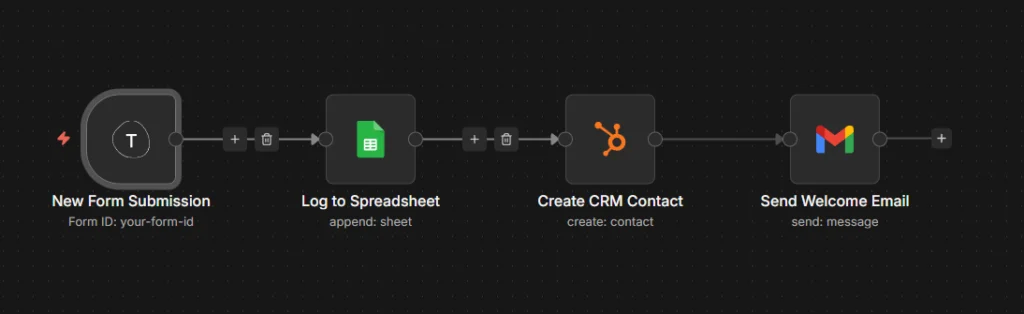
Lead Capture Flow Automatically captures new form submissions and feeds them straight into your business systems. Every lead gets logged to a spreadsheet for tracking, added to your CRM as a contact, and receives a welcome email – all within seconds of hitting submit.
Invoice Payment Reminder
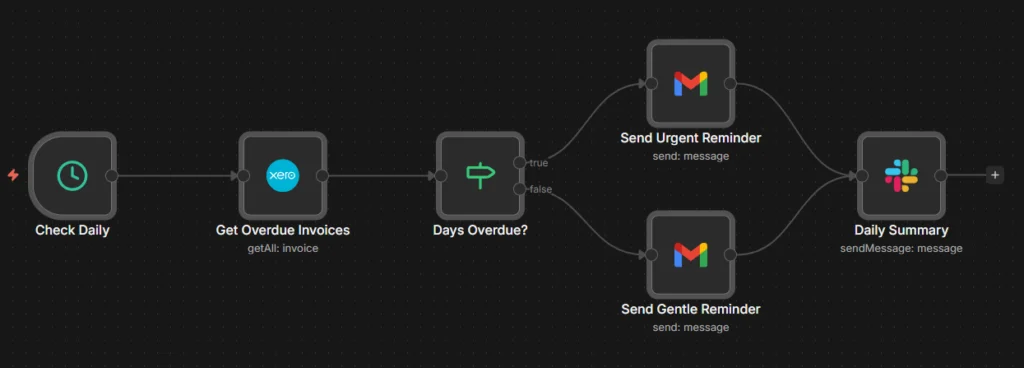
Invoice Payment Reminder Checks your accounting system daily for overdue invoices and sends the right reminder at the right time. Invoices that are seriously overdue get an urgent chase, while recent ones receive a gentler nudge. Your team gets a daily summary so nothing slips through the cracks.
Social Content Scheduler
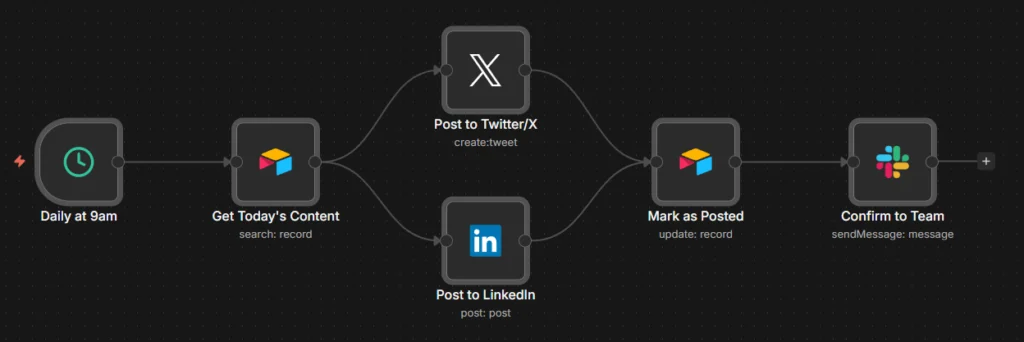
Social Content Scheduler Pulls scheduled content from your content calendar each morning and publishes it across Twitter/X and LinkedIn simultaneously. Once posted, it updates the calendar status and confirms to your team. No more manual copying and pasting across platforms.
Client Onboarding
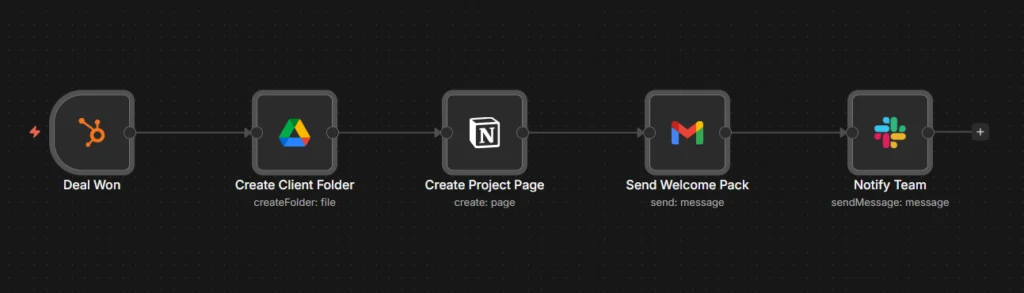
Client Onboarding Triggers the moment a deal is marked as won in your CRM. Automatically creates a client folder in Google Drive, sets up their project page in Notion, sends them a welcome pack, and notifies your team – ensuring every new client gets a consistent, professional start.
AI Email Triage
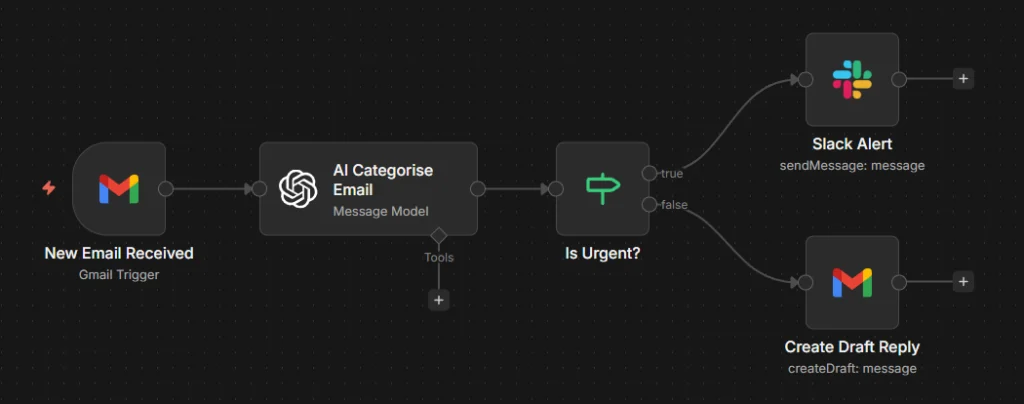
AI Email Triage Uses AI to read and categorise incoming emails as they arrive. Urgent messages trigger an immediate Slack alert so nothing critical gets missed. For everything else, it drafts a reply ready for your review – turning email management from a time-sink into a streamlined process.
Systems We Integrate With
Our systems connect with the platforms organisations already rely on.




























Most modern platforms expose APIs or integration layers.
Our automation systems connect these tools into reliable operational workflows.
Q&A's
Questions & Answers about Automation
What's the difference between automation and just using integrations like Zapier?
Zapier and similar tools are great for simple, single-step connections. But they’re limited when processes get complex, need conditional logic, or require error handling. We build structured automation systems using platforms like n8n that can handle multi-step workflows, branching logic, retries on failure, and integrations with systems that don’t have off-the-shelf connectors. It’s the difference between connecting two apps and orchestrating an entire process.
What kinds of tasks can actually be automated?
Anything repetitive, rule-based, or triggered by an event is a candidate. Common examples include: capturing and routing leads, sending follow-up emails, syncing data between platforms, generating reports, chasing overdue invoices, onboarding new clients, and triaging incoming messages. If a human is doing the same steps over and over, there’s usually an automation opportunity.
Will automation break if something changes in one of my tools?
It can, which is why we build with resilience in mind. That means error handling, retry logic, logging, and alerts when something fails. We also design workflows to be modular, so if one tool changes its API or you swap platforms, we’re not rebuilding from scratch. Ongoing support options are available to monitor and maintain systems over time.
How long does it take to set up an automation system?
Simple workflows can be live within days. More complex systems involving multiple platforms, conditional logic, and custom integrations typically take two to six weeks depending on scope. We map the process first, then build and test before going live. You’ll know the timeline before we start.
Do I need technical knowledge to use the automations once they're built?
No. Once a system is live, it runs in the background. You interact with your tools as normal and the automation handles the rest. If you want visibility into what’s happening, we can set up dashboards, logs, or notifications. And if you want to tweak things yourself, we can train you on the platform.
What platforms can you integrate with?
Most modern business tools expose APIs, which means they can be connected. We regularly work with CRMs (HubSpot, Salesforce, Pipedrive), accounting software (Xero, Sage), communication tools (Slack, Teams, Email), databases (Airtable, Google Sheets, Notion), and many others. If a tool has an API or webhook support, it can usually be integrated.
Is automation only useful for large companies?
Not at all. Smaller teams often benefit more because they have less capacity for repetitive admin. A two-person business automating lead capture, follow-ups, and invoicing can save hours every week. The key is identifying the right processes to automate, not the size of the company.
How do I know which processes are worth automating?
Start with pain points: tasks that are repetitive, error-prone, or bottleneck your team. If someone says “I spend hours every week doing X” or “things fall through the cracks when Y happens,” that’s usually a signal. We help identify these in our Automation Review, mapping your current workflows and highlighting where automation will have the biggest impact.
What's included in an Automation Review?
We look at your current tools, processes, and pain points. Then we identify specific opportunities for automation, estimate the effort involved, and outline what the solution would look like. You leave with a clear picture of what’s possible and what it would take to implement. No obligation to proceed, just an honest assessment.
What happens if my business processes change after the automation is built?
We design systems to be adaptable. If your process changes, we can update the workflow to match. For ongoing needs, we offer support arrangements so adjustments can be made as your operations evolve. Automation should support your business as it grows, not lock you into how things worked on day one.
Automation projects are structured around measurable efficiency and control improvements.
If your goal is to remove manual friction and streamline operations, we’ll begin with a structured review of your current processes.
This is not about replacing teams.
It’s about enabling them.